Safety meetings often fail because they’re rushed, disorganized, or repetitive. That’s where a well-structured toolbox talk template in Word can make the difference between a compliant team and a complacent one. Without a clear format, critical topics get glossed over, attendance goes unrecorded, and accountability fades.
A downloadable Word template fixes that. It’s editable, printable, and easy to standardize across crews. More importantly, it ensures consistency—something auditors, safety officers, and team leaders need.
This guide delivers a practical, free toolbox talk template in Word format—and shows you how to use it effectively.
What Is a Toolbox Talk Template?
A toolbox talk template is a pre-formatted document used to guide short safety meetings—often 10 to 15 minutes—held at the start of a shift or before high-risk tasks. These talks cover hazards, procedures, PPE requirements, and emergency responses.
Unlike formal safety training, toolbox talks are informal but documented. They’re designed to be conversational yet recordable—because in the event of an incident, proof of discussion matters.
A Word-based template works best because: - It’s accessible to nearly every office and field worker - It’s easy to customize and brand - It supports digital sharing and printing - It integrates with existing document control systems
Core Components of an Effective Template
Not all templates are created equal. A high-impact toolbox talk template includes these sections:
1. Topic & Date Clearly state what the talk covers (e.g., “Working at Heights”) and when it was conducted. Avoid generic titles like “Weekly Safety.”
2. Presenter Name & Role Assign accountability. Knowing who led the session improves follow-up and credibility.
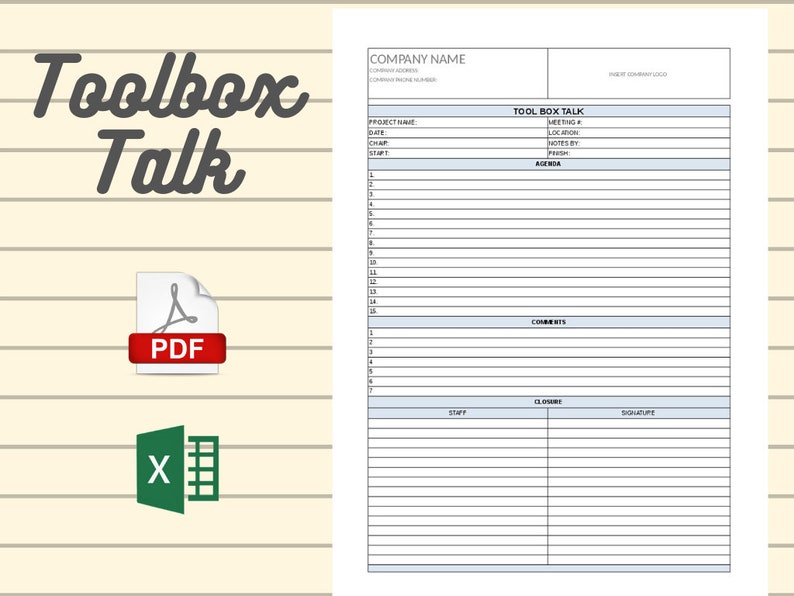
3. Attendee Sign-Off Sheet A table with columns for name, signature, and employee ID. This serves as legal documentation of participation.
4. Key Hazards Identified List specific risks related to the topic. For example, under “Excavation Safety,” include cave-ins, utility strikes, and atmospheric hazards.
5. Control Measures Detail how risks will be managed: barricades, permits, gas testing, etc.
6. Discussion Prompts Include 2–3 open-ended questions to spark engagement (e.g., “What near-misses have you seen during excavation?”).
7. Site-Specific Notes A blank section for location, equipment, or weather conditions that impact safety.
Skip templates that lack these. They may look polished but fail in enforcement and compliance.
Where to Download a Free Word Template

You don’t need to pay for a quality toolbox talk template. Several reputable sources offer free, editable Word versions:
- OSHA Official Website
- OSHA provides basic safety meeting outlines that can be adapted into Word documents. While not branded as “toolbox talks,” their hazard alerts and fact sheets are gold-standard references.
- Construction Safety Councils (Local Chapters)
- Many regional safety councils—like NASC or state-level associations—offer free downloadable templates tailored to local regulations.
- Safety Management Platforms (Free Tiers)
- Companies like SafetyCulture or SetuBridge provide free Word templates as lead magnets. In exchange for an email, you get a professionally designed, editable document.
- Industry Forums & Trade Groups
- Groups on LinkedIn or Reddit (e.g., r/safetypros) often share user-created templates. These are practical and field-tested but require vetting for compliance.
- Corporate EHS Departments (Public Resources)
- Some large contractors publish templates as part of their safety outreach. For example, Bechtel and Fluor have shared materials in past safety campaigns.
⚠️ Warning: Avoid templates from unverified blogs or PDF-only sites. Many contain outdated language, missing legal fields, or malware-infected downloads.
How to Customize Your Downloaded Template
A generic template only gets you halfway. Real value comes from customization.
Step 1: Add Your Company Header Insert your logo, name, and contact details at the top. This reinforces ownership and professionalism.
Step 2: Align with Your Safety Policies Reference internal documents, such as your Safety Manual Section 4.2 or Fall Protection SOP. This creates continuity.
Step 3: Localize the Content Change generic examples to reflect actual site conditions. If you’re working on a refinery, tailor hazard examples to confined spaces and hot work—not office ergonomics.
Step 4: Simplify Language Avoid jargon. Use plain English. If the crew doesn’t understand “atmospheric monitoring,” say “checking for dangerous gases.”
Step 5: Test It in the Field Run a pilot talk with a foreman’s crew. Ask: Was it clear? Did the sign-in sheet work? Adjust based on feedback.
One superintendent reported cutting meeting time by 30% after simplifying their template—because fewer follow-up questions were needed.
Common Mistakes That Undermine Toolbox Talks
Even with a great template, poor execution kills effectiveness. Watch for these pitfalls:
Mistake 1: Reading Word-for-Word Toolbox talks should be discussions, not lectures. Use the template as a guide, not a script.
Mistake 2: Repeating the Same Topics Monthly Crews tune out if they hear “PPE” every week. Rotate topics and revisit based on incident trends, not a fixed calendar.
Mistake 3: Skipping Sign-Ins No signature = no proof. If OSHA shows up, unsigned logs are as good as no records.
Mistake 4: Using One Template for All Sites A high-rise project has different risks than a pipeline job. Customize per site, per crew.
Mistake 5: Failing to Archive Paper copies get lost. Save completed talks in a shared drive with naming like “TT–FallProtection–SiteB–20250403.”
Real-World Use Cases: Templates in Action
Case 1: Roofing Contractor Avoids Citation A mid-sized roofing company used a Word-based template with photo placeholders. Before a steep-slope job, they added site photos showing harness anchor points. During an OSHA audit, the visual documentation helped them avoid a fall protection citation.
Case 2: Mining Crew Prevents an Incident During a talk on moving equipment, the template’s discussion prompt asked, “When do blind spots become most dangerous?” A loader operator mentioned dust at dusk. This led to a new rule: reduced speeds after 5 PM. A near-miss was avoided two weeks later.
Case 3: Electric Utility Standardizes Across 12 Teams
They downloaded a free template and added QR codes linking to equipment manuals. Field crews scan the code during talks for instant reference. Training retention improved by 40%.
Template Features That Actually Matter When evaluating a free toolbox talk Word template, prioritize:
- Editability: Can you remove or add sections easily?
- Print-Friendly Layout: Does it fit on one or two pages?
- Sign-In Table: Is there room for 10+ signatures without crowding?
- Branding Space: Can you add your logo and colors?
- Mobile Compatibility: Can supervisors pull it up on a tablet in the field?
Avoid templates with excessive graphics, locked fields, or embedded macros. These create more friction than value.
Download and Implement Today
A free toolbox talk template in Word isn’t just a document—it’s a compliance tool, a communication aid, and a risk mitigator. The best templates are simple, customizable, and built for real-world use.
Start with a trusted source. Customize it to your operations. Train your supervisors to use it as a dialogue starter, not a checklist.
Then, make it routine. Consistent, documented talks don’t just satisfy regulators—they save lives.
Download a proven Word template today. Fill in your details. Run your next safety talk with confidence.
Frequently Asked Questions
Where can I get a free toolbox talk template in Word? Reputable sources include OSHA’s website, safety councils, and EHS platforms like SafetyCulture or SetuBridge, which offer free downloadable templates.
Can I edit a downloaded Word template? Yes—ensure it’s not password-protected or in PDF format. A true Word (.docx) file allows full customization.
How often should toolbox talks be held? Weekly is standard, but frequency should match risk levels. High-hazard tasks may require daily talks.
Do toolbox talks need signatures? Yes. Signatures prove attendance and understanding. Always include a sign-in section.
Should every crew have the same template? Use a standardized format, but customize content per crew, site, and task for relevance.
What topics should I cover? Focus on current risks: fall protection, lockout/tagout, excavation, PPE, weather impacts, and near-misses.
Are digital toolbox talks acceptable? Yes, if documented properly. Use tablets or apps with signature capture and cloud storage for compliance.
FAQ
What should you look for in Free Toolbox Talk Template Word Download for Safety Teams? Focus on relevance, practical value, and how well the solution matches real user intent.
Is Free Toolbox Talk Template Word Download for Safety Teams suitable for beginners? That depends on the workflow, but a clear step-by-step approach usually makes it easier to start.
How do you compare options around Free Toolbox Talk Template Word Download for Safety Teams? Compare features, trust signals, limitations, pricing, and ease of implementation.
What mistakes should you avoid? Avoid generic choices, weak validation, and decisions based only on marketing claims.
What is the next best step? Shortlist the most relevant options, validate them quickly, and refine from real-world results.